Yabasic
To be able to make use of any of the games listed below your machine will need to have the
Yabasic programming language installed, it is available from here -
To be able to make use of any of the games listed below your machine will need to have the
Yabasic programming language installed, it is available from here -
the Yabasic Programming Language is the creation of ©1995-2025 Marc Ihm
To Use The Programs Here -
Create a folder in Documents and name it something like 'Yabasic Programs'
After clicking 'Download File' a page of code will appear.
Right click on the code and 'Select All' .
Copy and Paste the code into Notepad, (Notepad can be found in Windows Tools/Accessories).
This will then need to be 'Saved As' to your Yabasic folder with the filename having a .yab extender.
e.g. fruitmachine.yab
Note - when saving, change the file type from Text Document (*.txt) to 'All Files'.
Provided you have Yabasic installed on your machine, you will then be able to doubleclick on
the filename in your Yabasic folder to run the program or you could right-click and use 'Send To'
to create a clickable desktop icon.
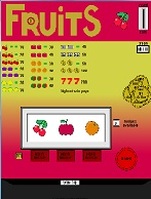
Fruit Machine
This program simulates a typical Fruit (slot) machine but without risking your hard-earned cash!
Complete with Hold and Nudge features |
| ||||||
Acey-Ducey
Decide if the next card's value falls between the value of 2 face-up cards.
|
| ||||||
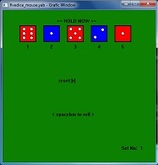
Five Dice
Try and achieve the best sequence possible by either Rolling or Holding the dice.
|
| ||||||
Chuck-A-Luck |
| ||||||
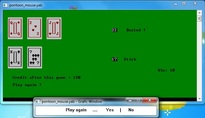
Pontoon
Card game in the same vein as Blackjack or Twentyones.
|
| ||||||||
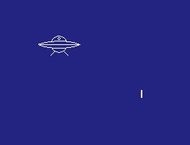
Flying Saucers
Use your missiles to intercept and destroy the invading flying saucers!
|
| ||||||
The Halloween Machine
Another slot machine program
This time with spooky halloween themed graphics and a trick-or-treat chance feature. |
| ||||||
Pairs
Turn 2 cards by clicking on them
if the cards are a pair then they are removed. The idea is to clear the table in the least number of moves. |
| ||||||
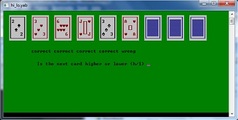
Hi-Lo
A simple solitaire card game game.
Just decide whether the next card is higher or lower and hit that button! |
| ||||||
Getting Started With Writing Your Own Programs
Yabasic is a well-featured yet simple BASIC programming language similar enough to most 'standard' BASICs to be easily mastered by anyone with BASIC programming experience.
For the novice there are many BASIC programming tuition manuals available, either books or online articles.
It should be possible to resolve any differences in syntax between Yabasic and other BASICs by studying the Yabasic manual.
For the novice there are many BASIC programming tuition manuals available, either books or online articles.
It should be possible to resolve any differences in syntax between Yabasic and other BASICs by studying the Yabasic manual.
Yabasic does not have a built-in program-writing editor but fortunately Windows provides users with 'Notepad', a simple note-writing app that will be quite adequate for writing and saving your Yabasic programs -
Press the Start/Windows key > scroll down the list of programs/apps and look in
> Windows Tools for > Notepad (or Windows 10 Accessories)
Open Notepad and into it type the following -
|
clear screen print "Hello World" print "This is a sample program" end |
Now go up to the top left of Notepad and click on 'File' and select 'Save As'
In the Save-Window make sure the address line is pointing to the folder where you want to save your programs.
If one does not exist, you may need to create a new folder for your Yabasic programs in Documents.
In the lower part of the Save-Window, in the File Name box, type sampleprogram.yab
Where it says 'Save As Type' use the drop-down to change from Text Documents (*.txt) to All Files
Click Save and the program should now be saved in your Yabasic folder with a colored icon.
From there the program can now be run either by double-clicking on the file icon
or by right-clicking and selecting 'Execute'.
In the Save-Window make sure the address line is pointing to the folder where you want to save your programs.
If one does not exist, you may need to create a new folder for your Yabasic programs in Documents.
In the lower part of the Save-Window, in the File Name box, type sampleprogram.yab
Where it says 'Save As Type' use the drop-down to change from Text Documents (*.txt) to All Files
Click Save and the program should now be saved in your Yabasic folder with a colored icon.
From there the program can now be run either by double-clicking on the file icon
or by right-clicking and selecting 'Execute'.
The software above has been created by ©2008-2025 alan.steelbat
Using the Yabasic Programming Language created by ©1995-2025 Marc Ihm
and is free to use under the Terms of the MIT License
Using the Yabasic Programming Language created by ©1995-2025 Marc Ihm
and is free to use under the Terms of the MIT License
Permission is hereby granted, free of charge, to any person obtaining a copy of this software and associated documentation files (the "Software"), to deal in the Software without restriction, including without limitation the rights to use, copy, modify, merge, publish, distribute, sublicense, and/or sell copies of the Software, and to permit persons to whom the Software is furnished to do so, subject to the following conditions:
The above copyright notice and this permission notice shall be included in all copies or substantial portions of the Software.
THE SOFTWARE IS PROVIDED "AS IS", WITHOUT WARRANTY OF ANY KIND, EXPRESS OR IMPLIED, INCLUDING BUT NOT LIMITED TO THE WARRANTIES OF MERCHANTABILITY, FITNESS FOR A PARTICULAR PURPOSE AND NONINFRINGEMENT. IN NO EVENT SHALL THE AUTHORS OR COPYRIGHT HOLDERS BE LIABLE FOR ANY CLAIM, DAMAGES OR OTHER LIABILITY, WHETHER IN AN ACTION OF CONTRACT, TORT OR OTHERWISE, ARISING FROM, OUT OF OR IN CONNECTION WITH THE SOFTWARE OR THE USE OR OTHER DEALINGS IN THE SOFTWARE.
The above copyright notice and this permission notice shall be included in all copies or substantial portions of the Software.
THE SOFTWARE IS PROVIDED "AS IS", WITHOUT WARRANTY OF ANY KIND, EXPRESS OR IMPLIED, INCLUDING BUT NOT LIMITED TO THE WARRANTIES OF MERCHANTABILITY, FITNESS FOR A PARTICULAR PURPOSE AND NONINFRINGEMENT. IN NO EVENT SHALL THE AUTHORS OR COPYRIGHT HOLDERS BE LIABLE FOR ANY CLAIM, DAMAGES OR OTHER LIABILITY, WHETHER IN AN ACTION OF CONTRACT, TORT OR OTHERWISE, ARISING FROM, OUT OF OR IN CONNECTION WITH THE SOFTWARE OR THE USE OR OTHER DEALINGS IN THE SOFTWARE.